
Product Update February 6, 2026
We are pleased to announce that you can now manage relationships between records from the Tamr Cloud UI. We also added filtering options for Curator Hub queues and support for private links to ADLSv2.
Manage Relationships in the UI
Customers using a System of Record can now create and manage relationships between records from 360 View pages in the UI. Previously, relationships could be managed by through the Tamr Cloud Relationships API.
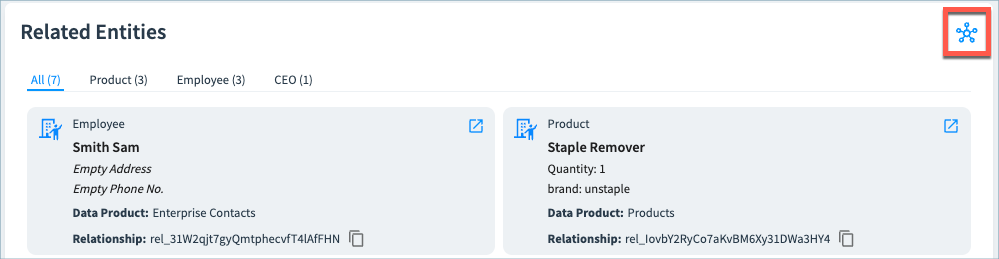
All data product viewers and developers can review relationship details on the new View Relationships page, available by selecting the View Relationships icon on the 360 page.
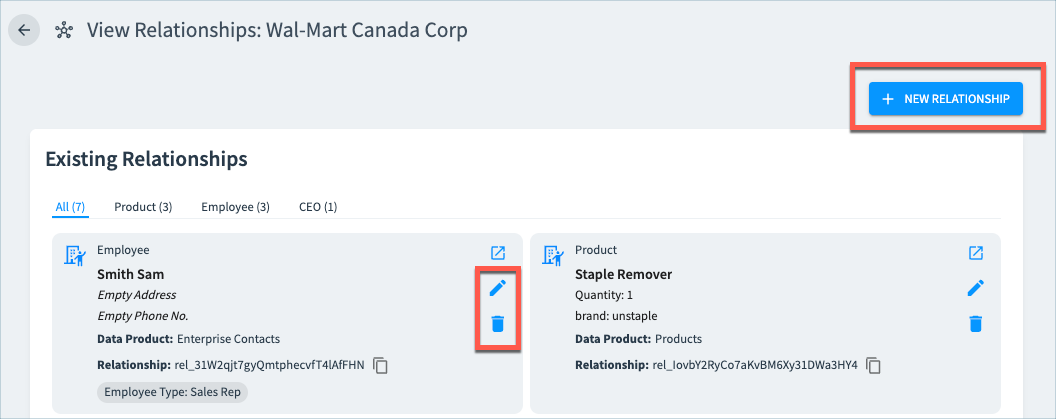
Data product admins and curators can edit and delete relationships on View Relationship page, and can also create new relationships between records.
See Managing Relationships for full details.
Interested in using relationships? Contact Tamr Support ([email protected]) for assistance in configuring relationship types for your data products.
Filter Curation Queue Events
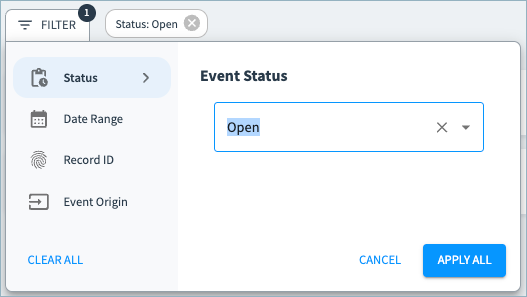
In Curator Hub, you can now filter events in the Suggested Duplicates and Suggested Edits queues to quickly find the events you want to review. You can filter by event status, date ranges, record ID, and (for suggested duplicates) event origin.
For more information about Curator Hub and curation queues, see Curating Records in the System of Record.
ADLSv2 Private Link Support
We now support private links to ADLSv2 for your ADLSv2 connections. See Configuring an ADLSv2 Private Link .
Bug Fixes and Other Improvements
- General usability, styling, and performance improvements.