
Use the Source Records API to create, read, update, and re-link (move) the individual source records that contribute to golden records in a Tamr Cloud table. Each source record write can re-consolidate the affected golden record right away. You can also choose not to re-consolidate the golden record (for example, to defer re-consolidation and apply it later).
Source Record Operations
You can:
- Create a new source record in a table, linking it to an existing golden record or creating a new golden record.
- List source records associated with a specified golden record ID.
- Get a source record by its source system name and source record ID.
- Update a source record to replace its data with new or changed values.
- Move a source record to link it to a different golden record, or link it to a newly created golden record.
All calls to this endpoint require a projectId and tableId value. See Obtaining Resource IDs.
Key Concepts
Source Records and Golden records
A source record is one record from one source system. A golden record (called a record in the API) is the mastered record to which zero or more source records contribute.
Every source record links to exactly one golden record, while a golden record can have links to multiple source records. The recordId on a source record is the parent golden record's ID. Source records can move from one golden record to another. The source record’s linked recordId value updates in real-time to its new parent golden recordId. Use tableId and recordId together to fetch the golden record from the tamr.api.v1alpha1.Records API.
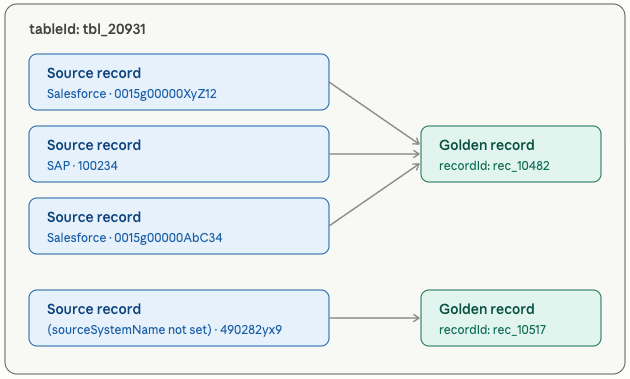
Source Record Identity
A source record is identified within a table by sourceSystemName and sourceRecordId:
sourceRecordIdis the record's ID in its source system. It is not a Tamr record ID.sourceSystemNameis optional. A record written without asourceSystemNameis distinct from a record written with one: ("systemA", "rec1") and (unset, "rec1") are two different source records.- On get, update, and move, omitting the
sourceSystemNamequery parameter addresses the record that has no source system name. It does not match any source system.
Choosing a sourceSystemName: If the source already exists in Tamr, set sourceSystemName to the source name shown in the Tamr UI.
Data schema: TABLE versus SOURCE
TABLE versus SOURCEThe dataSchema of a source record's latest write governs how Tamr treats that record at every future re-consolidation. If you create a record with SOURCE and later update it without setting dataSchema, the record switches to TABLE. Set dataSchema explicitly on every write.
| Value | Behavior |
|---|---|
TABLE (default) | Data already conforms to the table schema. Tamr validates the schema of the source record and skips schema mapping. |
SOURCE | Data is in the source system's schema. Tamr maps the source schema to the table schema. In order to use this option, this source must be mapped to the data product’s schema in the data product configuration. The operation fails with INVALID_ARGUMENT if the source schema has not been mapped, including when sourceSystemName is empty. |
Standardization
If the table has data standards configured, Tamr applies them the standards to source record data on write. (See Adding and Adjusting Standards in a Data Product.) As a result:
- The data returned by a write can differ from the data you sent.
- Get and list return the standardized form when one exists; otherwise, they return the values as mapped to the table schema.
Controlling Re-consolidation
By default, each create, update, or move re-consolidates the affected golden record(s). Set disableRecordUpdate: true to write the source record and its link without changing golden record data.
You might use this option to batch changes. For example, when adding many source records to one golden record, set disableRecordUpdate: true on every request except the last.
On tables without record consolidation rules, golden record data is never derived from source records. disableRecordUpdate is accepted but has no effect.
Consolidation Maximum
A golden record whose linked source records exceed the maximum number of source records that can be used in consolidation cannot be re-consolidated. Any write that would re-consolidate the golden record fails with FAILED_PRECONDITION and writes nothing. To write to or link against that record, set disableRecordUpdate: true. To update the golden record data directly, use the update record API.
Note: Contact Tamr Support ([email protected]) for inquiries related to this limit.
Dry Run
Set dryRun: true on any write to compute the result without persisting it. The response sourceRecord.data is the row the write would store, after mapping and standardization.
Webhooks
Tamr sends webhook events for golden records only. Updates to golden record data as a result of source record changes send webhook events. However, creating, updating, or moving a source record does not send a source record event.
Hybrid Source Integration
A source system can be integrated with a Tamr data product via both the APIs and Tamr's workflows simultaneously. For example, when a client calls the API for a source system the records are updated to the client-provided values. When a user refreshes the same source system staged in Tamr and runs the resolve workflow, the same source records are updated to the values in the staged source.
Best practice:
- If the source is already used by a workflow, add and update its records through the workflow.
- If you write records for that source through the API, keep the source system in sync with your API writes.