
Protecting Sensitive Data in RealTime Data Products
Limited ReleaseRealTime data products are in limited release. Some functionality is still in development and is subject to change. If you are interested in using these data products, contact Tamr Support ([email protected]).
Your data product might include sensitive information such as birth date, national IDs, email addresses, and so on, that you may not want all users to access. You can choose to hide sensitive data from users with the data product viewer role. (See Managing Permissions for RealTime Data Products for details on data product roles.)
If configured, sensitive data is hidden from viewer users on the data product’s 360 pages and in the Curator Hub > Records table. In these pages, sensitive attribute data is shown as Restricted.
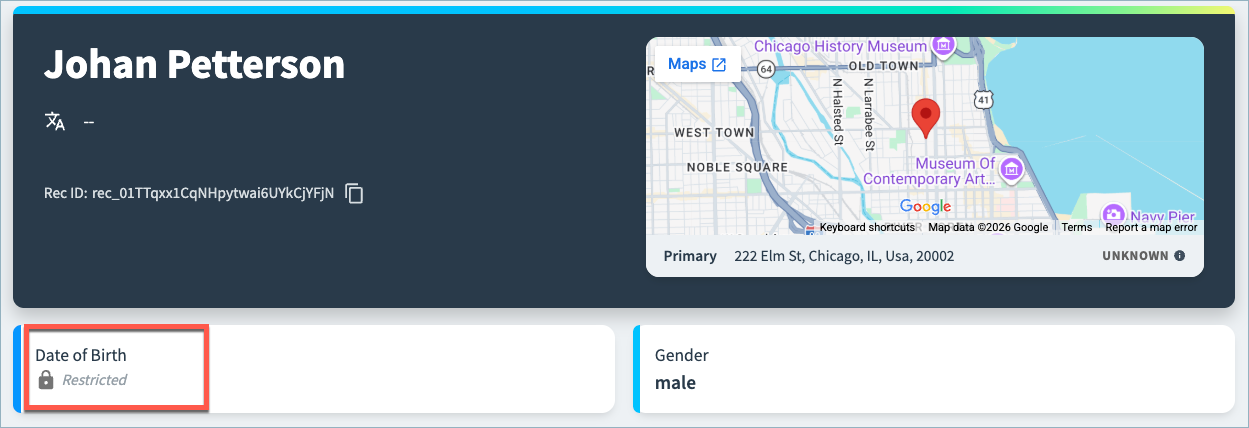
The attribute values are not redacted for users with curator, developer, or admin roles in the data product.
Configuring Sensitive Attributes
Unlike other configuration changes, marking an attribute as sensitive takes effect as soon as you deploy the draft changes. You do not need to run a workflow to apply the changes to your records.
To configure sensitive attributes:
- On the Data Products page, select Configure Data Product on the data product card.
- In Sources and Schema Mapping section, select Schema management.
- Enable the Sensitive toggle for each attribute that contains sensitive information. Values for these fields will be redacted from users with only viewer permission for the data product.
- Select Save Draft and return to the main configuration page.
- In Pending Changes, Validate your configuration changes and then select Apply Draft and Deploy.
Updated 5 months ago