
Using Enriched Firomgraphic Values in Golden Records
When Tamr enriches your company records, the attributes supplied by the firmographic enrichment sources are added as additional record attributes.
You can also choose to use values from the firmographic enrichment sources as golden record values for all attributes other than address, email, and phone attributes, including:
- Alternative Names
- Associated Persons
- Company Name
- Company Type
- Email Domain
- Founding Year
- Industry Type
- Previous Names
- Registration Number
- Registration Number Type
- Revenue
- Stock Exchange
- Tax Ids
- Ticker Symbol
- Custom attributes
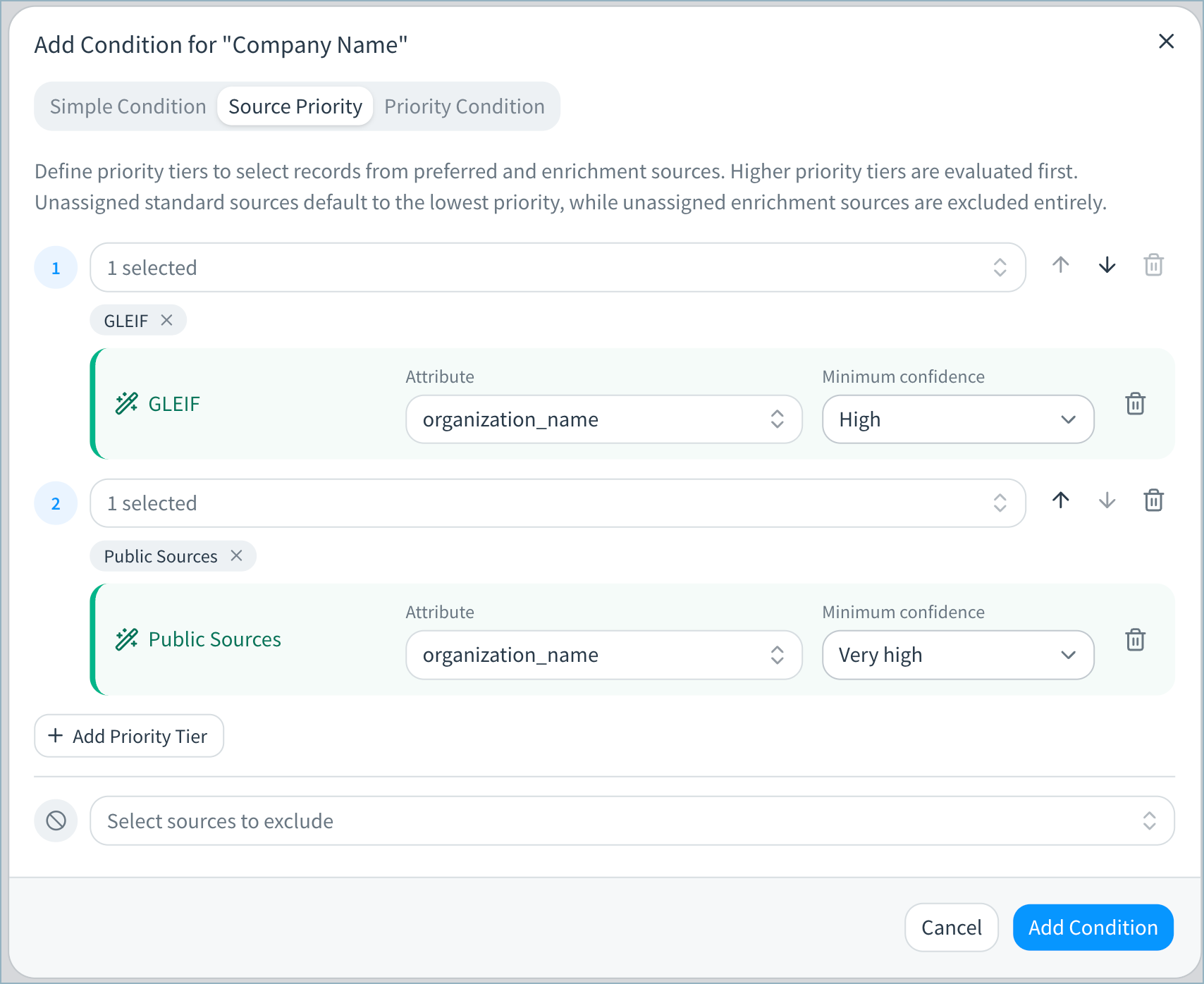
You can select which enriched attribute from the source to use as the golden record value and the minimum confidence for the enrichment match. For example, you may want to use the organization_name value returned by GLEIF enrichment as the golden record company name, provided the match is at high or very high confidence.
To prioritize firmographic enrichment values in golden records:
-
On the Data Products page, select Configure Data Product on the data product card.
-
In the Golden Records card, select Consolidation rules. The Consolidation Rules page opens.
-
Select the attribute you want to adjust.
-
Select Add Condition and choose Source Priority.
-
On the Source Priority tab, configure priority tiers to select records from your preferred firmographic source. You can add one or more sources to each tier.
-
Select the enrichment source from the Select sources dropdown menu.
-
Select which enriched attribute from the source to use as the golden record value.
-
Select the minimum confidence for the enrichment match when prioritizing an enrichment source.
-
-
Select Add Condition to add this condition.
-
Adjust other consolidation rules as needed.
-
Select Save Draft when you have finished updating the rule.
-
Return to the main configuration page.
-
In Pending Changes, Validate your configuration changes and then select Apply Draft and Deploy.
Updated 3 days ago